Your Mac deserves
a better file manager.
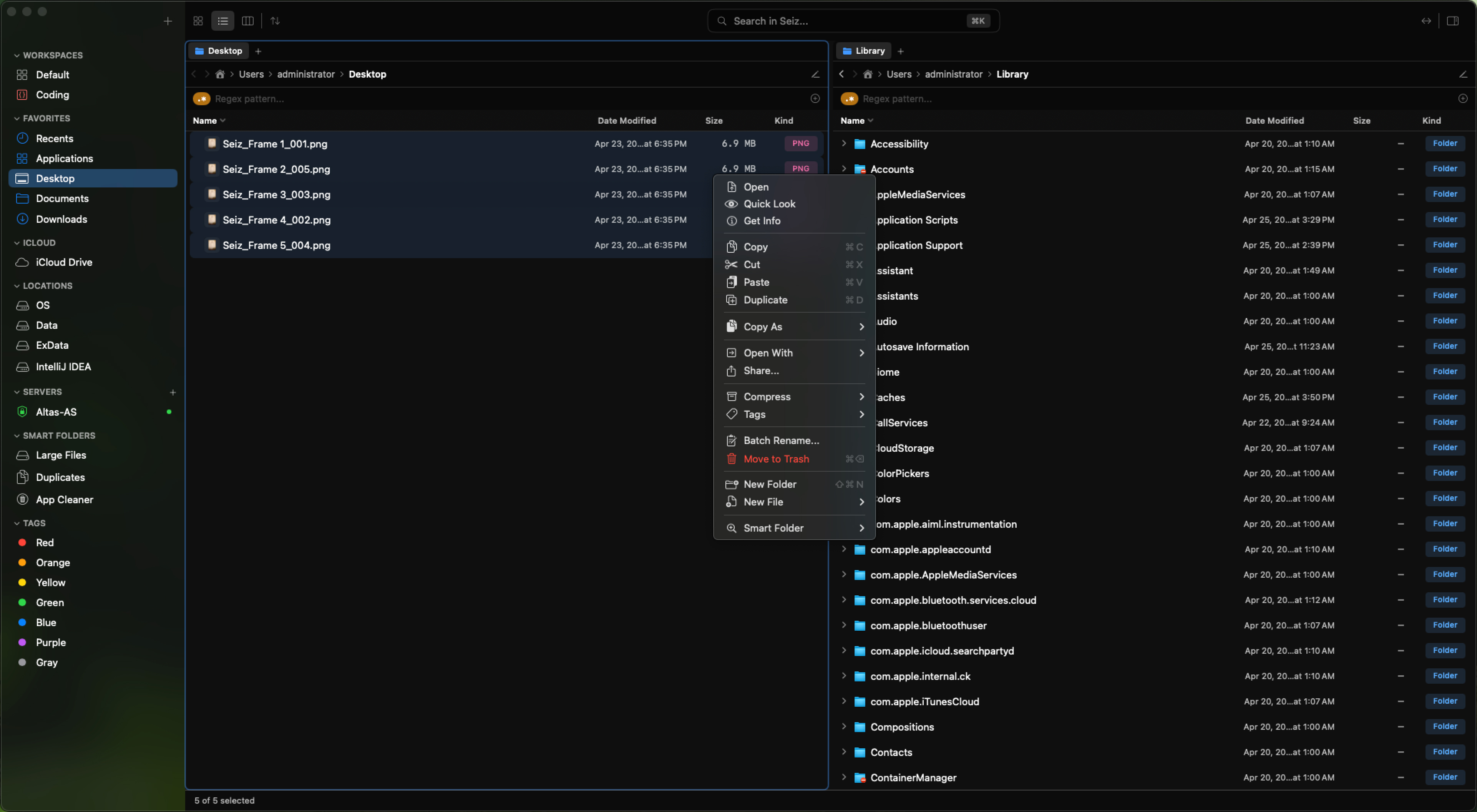
Seiz is a native macOS file manager built in pure Swift. Multi-pane layouts, command bar, 70+ file previews, local AI. No subscription. No Electron. No cloud.
The Problem
Finder is fine for your parents.
You've outgrown it. Here's how you know.
Finder hasn't changed.
macOS has had three major redesigns. Finder's column view looks exactly the same as it did in 2005.
Side-by-side panes in Finder.
You can't open two folders next to each other. Every drag-and-drop is a juggling act with overlapping windows.
Apps just to manage files.
Batch rename. SFTP client. Archive viewer. Hex editor. You've got five apps open for what should be one.
Column width auto-sizing.
Finder truncates filenames. Always. Every column, every time. You drag manually, it forgets on the next visit.
Real search in Finder.
No fuzzy matching. No regex. No multi-condition filters. Spotlight returns results you didn't ask for.
Your workflow. Your layout.
Finder has one layout mode with no real customization. Power users deserve a tool that adapts to how they work.
Features
Everything you wished Finder could do.
Your layout. Your rules. Saved forever.
Split your screen into up to four independent panes, each with its own tabs, sort order, and view mode. Save the entire arrangement as a Workspace and restore it in one click — every tab, every path, exactly where you left off.
- 1 to 4 panes — single, dual, triple, or quad layouts
- Unlimited tabs per pane with drag-and-drop reordering
- Workspaces remember every pane, tab, path, and scroll position
- Switch Workspaces instantly — no re-navigating, no setup
Rename 100 files in seconds.
Select any number of files, stack up rules — add a counter, swap out text, prepend a date — and watch a live before/after preview update with every keystroke. When it looks right, hit Apply. Undo brings everything back instantly.
- Rule-based: numbering, text replace, date stamp, case change, and more
- Live preview updates as you type — no surprises on Apply
- Works on hundreds of files without freezing the UI
- Full undo/redo — one keystroke to revert the entire batch
Search by meaning. Not just by name.
Type what you're looking for in plain language — 'that contract from January' or 'photos from the beach trip.' Seiz uses on-device AI to understand file contents and metadata, returning results ranked by relevance. No cloud. No indexing delay. Works offline.
- Natural language queries — describe what you need, not what it's called
- Understands file contents, EXIF data, and surrounding context
- Runs entirely on-device with Apple Neural Engine — nothing leaves your Mac
- Results ranked by relevance with instant preview on hover
More Features
Built for power users.
Remote Connections
Connect to SFTP, FTP, WebDAV, SMB, and Amazon S3. SSH host key verification (TOFU). Auto-reconnect with exponential backoff.
File Sync
Bidirectional sync between local and remote. Conflict resolution, bandwidth throttling, scheduled sync. No extra app.
Workspaces
Save your entire layout — panes, tabs, paths, sort order — as named presets. Switch in one click. Auto-save keeps them current.
Duplicate Finder
Find exact copies with SHA-256 hashing. Spot near-identical images with perceptual hashing — resized, recompressed, or cropped.
Archive Master
Compress to ZIP, TAR, 7Z, ZSTD and more. Extract 10 formats including RAR. Password-protected 7z. No extra app needed.
35+ Shortcuts
Every shortcut fully remappable. Built-in conflict detection. Three-layer input handling ensures nothing is swallowed by macOS.
Built-in Previews
Preview images, video, audio, code with syntax highlighting, PDFs, hex, and markdown — all inline. No plugins. 70+ file types.
Smart Folders
Pre-built smart filters: Recent Files, Large Files, Duplicates, Untagged Items. Always up to date, zero maintenance.
Advanced Filters
Filter by name, extension, kind, tag, size range, or date range. Regex and fuzzy matching built-in. Stack multiple conditions.
Performance
Native Swift. Not Electron.
Most "modern" file managers are web apps in a native costume. Seiz is built with Swift 6 and SwiftUI + AppKit — the same stack Apple ships their own apps with.
Your file manager should be the fastest app on your Mac. Not the heaviest.
Local AI
Smart features. Zero cloud.
Every AI feature in Seiz runs 100% locally on your Mac — using Ollama or Apple MLX. Your files never leave your machine. No API keys. No internet. No data collection.
Smart Rename — Live Preview
Files named by what they contain.
Select a file. Seiz reads the content and suggests a professional filename. You review it, approve it, rename it. The AI suggests — you decide.
Search by meaning, not filename.
Type "beach vacation photos" and Seiz finds images that look like beach photos — even if they're named IMG_001.jpg. Full-meaning document search across your entire drive.
500 unsorted files. One click to organize.
Drop 500 unsorted files into a folder. Tell Seiz to group them. AI clusters files by project, topic, or type and suggests folder names. Review before applying.
100% on-device. Works offline. Your files are your business.
Ollama (Phi-3, Llama-3, Mistral) · Apple MLX (Apple Silicon) · Custom model support
Privacy & Security
Your files. Your business.
Seiz is built with a simple rule: your data never leaves your Mac unless you tell it to. No telemetry, no analytics, no cloud dependencies. Every AI feature runs locally. Every connection is under your control.
No account required to use Seiz. No sign-up. No email verification. Download, enter your license key, and you're done. We don't know who you are — and we like it that way.
100% Local AI
AI runs via Ollama on localhost only. Remote endpoints are silently rejected. No API keys. Works fully offline.
Zero Telemetry
No tracking, no analytics, no crash reports sent anywhere. No account required. Your usage is your business.
GPS Stripped
Photo metadata extraction intentionally excludes GPS coordinates. Your location data stays private, always.
SSH Verified
SFTP connections use Trust-On-First-Use host key verification. Endpoints validated. Full-disk access for complete file management.
Comparison
See how Seiz stacks up.
| Feature | Finder | ForkLift | Path Finder | Commander One | Seiz |
|---|---|---|---|---|---|
| Command Bar (⌘K) | |||||
| Local AI (rename, search, grouping) | |||||
| Duplicate detection (perceptual hash) | |||||
| 35+ remappable shortcuts | |||||
| Native Swift + SwiftUI | |||||
| Dark mode first | |||||
| Multi-pane (up to 4) | Dual | Dual | Dual | ||
| Workspaces | |||||
| Batch rename (live preview) | Basic | Basic | |||
| Archive (7 compress + 10 extract) | ZIP only | ||||
| Remote (SFTP, S3, WebDAV, SMB) | SMB only | ||||
| File sync | |||||
| Tabs | |||||
| Auto-size columns |
FAQ
Frequently asked.
Early Access
Get notified when Seiz launches.
Join the waitlist for early access and 30% off at launch. No spam — ever.